Bend Allowance Calculator
Enter thickness, inside radius, angle and K-factor to get the bend allowance, bend deduction and the flat length of your part.
At a glance
Bend Allowance Calculator is a free browser tool that works out bend allowance, bend deduction and flat blank length for sheet metal from thickness, radius, angle and K-factor.
- Free and runs in your browser, with no installation and no sign-up.
- Works in millimetres or inches.
- Calculates bend allowance, bend deduction and flat blank length, with the formula shown.
- K-factor defaults to 0.44; the page gives a range of about 0.33 to 0.5.
- Number of bends can be set from 1 to 20.
- Results are for estimation; verify critical designs against the applicable standard and supplier data.
Sources: Bending (metalworking) (Wikipedia) (checked 2026-10-15)
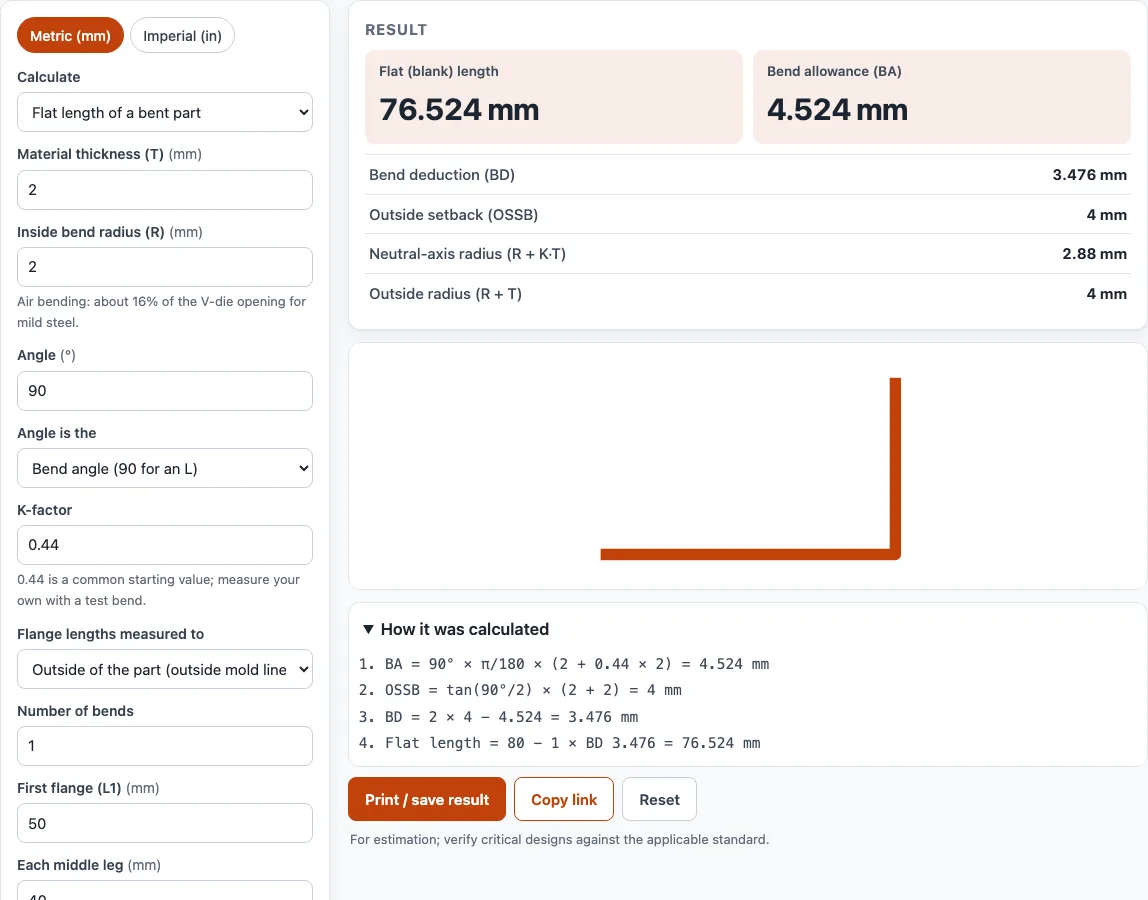
How to use the Bend Allowance Calculator
- Choose your units with the ‘Metric (mm)’ / ‘Imperial (in)’ switch at the top of the tool.
- Open the ‘Calculate’ menu and pick a mode: ‘Flat length of a bent part’, ‘Bend allowance and deduction (one bend)’, or one of the two K-factor modes.
- Enter the material thickness (T) and the inside bend radius (R).
- Enter the angle, then set ‘Angle is the’ to either the bend angle (90 for an L) or the included angle between the legs. For an included angle, the tool uses bend angle = 180 − included angle.
- Check the K-factor. It defaults to 0.44, close to the 0.4468 average that is the most commonly used value. Replace it with a value from a test bend if you have one.
- For flat length, choose how the flanges are measured: ‘Outside of the part’, ‘Inside of the part’, or ‘End of the bend (flat leg only)’.
- Set the number of bends (1 to 20), then enter the first flange (L1), each middle leg and the last flange (L2).
- Read the results: flat (blank) length, bend allowance (BA), bend deduction (BD), outside setback (OSSB), neutral-axis radius and outside radius. The side-view sketch and calculation steps show your numbers.
- If a warning appears, check that input before you use the result.
Under the result, ‘Print / save’ prints a sheet with your inputs, results, calculation steps and the date. ‘Copy link’ gives you a link that reopens the page with the same inputs, and ‘Reset’ clears the form.
How to calculate bend allowance
To calculate bend allowance, multiply the bend angle in radians by the neutral-axis radius, which is R + K × T. In symbols, BA = A × π/180 × (R + K × T), where A is the bend angle in degrees, R is the inside radius, T is the thickness and K is the K-factor.
For a 90 degree bend, A × π/180 becomes π/2, so the bend allowance formula for a 90 degree bend is BA = (π/2)(R + K × T), or about 1.5708 × (R + K × T). Take T = 2 mm, R = 2 mm and K = 0.44. The neutral-axis radius is 2 + 0.44 × 2 = 2.88 mm, so BA = 1.5708 × 2.88 ≈ 4.524 mm.
The K-factor is the position of the neutral axis as a fraction of the thickness, measured from the inside of the bend. Steve Benson’s articles in The Fabricator give 0.4468 as the average value used most often, and a range of about 0.33 to 0.5 (0.5 is the largest possible). It depends on the material, radius, thickness and tooling, so a test bend gives the most reliable value. Machinery’s Handbook writes the same formula as BA = (0.01743 × R + 0.0078 × T) × N, which corresponds to K ≈ 0.45.
What is the difference between bend allowance and bend deduction
Bend allowance is the length of the neutral axis through the bend, and you add it to the flat legs. Bend deduction is the amount you subtract from the outside dimensions to get the flat length.
Both describe the same bend, so one can be worked out from the other. The outside setback is OSSB = tan(A/2) × (R + T), and BD = 2 × OSSB − BA. With the same 90 degree example, OSSB = tan(45°) × (2 + 2) = 4 mm, so BD = 8 − 4.524 = 3.476 mm.
Which one you use depends on how the part is dimensioned. If the legs are measured to the outside, subtract the bend deduction: outside flanges of 50 mm and 30 mm give a flat length of 50 + 30 − 3.476 = 76.524 mm. If the legs are measured to the end of the bend (the flat leg), add the bend allowance instead. Measuring to the inside uses the inside setback, tan(A/2) × R.
Sources
Data and rules used by this tool (checked October 2026):
Frequently asked questions
What is K factor in sheet metal?
The K-factor is the position of the neutral axis as a fraction of the material thickness, measured from the inside of the bend. Values range from about 0.33 to 0.5, and 0.4468 is the average most often used (Benson, The Fabricator).
How do I find the K factor?
Cut a strip, measure its flat length, bend it once, then measure both outside flanges. Calculate BD = L1 + L2 − flat length, then BA = 2 × OSSB − BD, and K = (BA ÷ (A × π/180) − R) ÷ T. The tool does this in the ‘K-factor from a test bend’ mode.
What is the bend allowance formula for a 90 degree bend?
For a 90 degree bend, BA = (π/2)(R + K × T), which is about 1.5708 × (R + K × T). Use the same R, K and T in the same units as your part.
Can I use the results for a quote or client job?
Yes. Results and printouts may be used in commercial work such as quotes, client jobs and products, with no attribution required.
Are the results accurate enough for production?
Results are for estimation. Verify critical designs against the applicable standard and the material supplier’s data before you cut or bend.
Can I work in inches?
Yes. Use the ‘Metric (mm)’ / ‘Imperial (in)’ switch at the top of the tool.
Related tools
- Bend radius calculator: use it to choose an inside bend radius before you set the bend allowance.
- Sheet metal gauge chart: use it to look up steel sheet thickness in gauge numbers.
- Stainless steel gauge chart: use it to check thickness for stainless sheet.
- Aluminum gauge chart: use it to check thickness for aluminum sheet.
- Steel plate weight calculator: use it to estimate the weight of a steel plate or blank.
- Laser cutting cost calculator: use it to estimate cutting costs once you have the flat size.
- Metal weight calculator: use it to estimate the weight of a metal part.
- Laser cut box generator: use it to create box layouts for laser cutting.
- K-factor calculator: use it to estimate K from radius, thickness and method.