Sheet Metal Bend Radius Calculator
Estimate the inside radius an air bend will give with your V-die, the minimum radius a material can take, or convert inside and outside radius.
At a glance
Sheet Metal Bend Radius Calculator is a free, browser-based tool that estimates the inside bend radius for sheet metal and steel plate, the minimum bend radius before cracking, and outside or neutral-axis radius.
- Free, browser-based tool that runs with nothing to install and no sign-up.
- Air-bend inside radius is estimated as R ≈ V × p, where V is the V-die opening.
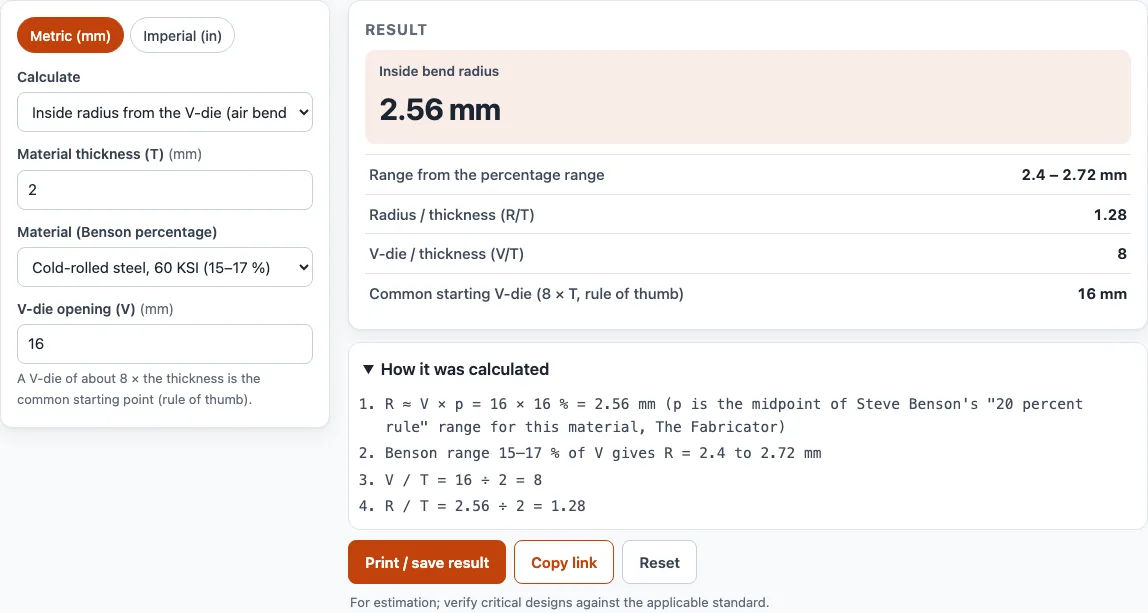
- Cold-rolled steel 2 mm thick with a 16 mm V-die gives R ≈ 2.56 mm, range 2.40–2.72 mm.
- Minimum bend radius uses R_min / T = 50 / r − 1, where r is reduction of area in percent.
- A sharp-bend warning appears when the inside radius is below about 63% of thickness.
- Results are estimates; verify critical designs against applicable standards and supplier data.
Sources: Bending (metalworking) (Wikipedia) (checked 2026-10-15)
How to use the Bend Radius Calculator
- Choose your units with the ‘Metric (mm)’ / ‘Imperial (in)’ switch at the top of the tool.
- Open the ‘Calculate’ menu and pick a mode:
- ‘Inside radius from the V-die (air bending)’ for a radius based on the die you will use.
- ‘Minimum bend radius from tensile reduction of area’ for the tightest bend the material can take.
- ‘Outside / inside / neutral-axis radius’ to convert between radius types.
- For air bending, enter the ‘Material thickness (T)’ and the ‘V-die opening (V)’.
- Pick a ‘Material’ from the list. The tool uses the midpoint of the percentage range for that material. For a plate that is not listed, choose the closest steel or enter your own value in ‘Radius as % of the V-die opening (custom)’.
- For minimum bend radius, enter the ‘Tensile reduction of area (r)’ from your material certificate or datasheet, along with the thickness.
- For the third mode, set the ‘Convert direction’, enter the ‘Radius you know’, and adjust the ‘K-factor’ if your shop uses a different value.
- Read the result. If the bend is too tight, the tool shows a warning.
Under the result, ‘Print / save’ prints a sheet with your inputs, results, calculation steps and the date. Use your browser’s Save as PDF option to keep a copy. ‘Copy link’ creates a link that reopens the page with the same inputs, which is useful for sharing a job. ‘Reset’ clears the inputs.
How to calculate inside bend radius
For air bending, the inside radius is about the V-die opening times a percentage: R ≈ V × p. Here V is the V-die opening, and p comes from Steve Benson’s “20 percent rule” published in The Fabricator. The percentages are 20–22% for 304 stainless, 12–14% for 5052-H32 aluminum, 14–16% for hot-rolled pickled and oiled steel, and 15–17% for cold-rolled steel at 60 KSI.
For example, cold-rolled steel 2 mm thick with a 16 mm V-die gives R ≈ 2.56 mm, with a range of 2.40–2.72 mm. The V/T ratio is 8 and R/T is 1.28. A V-die about 8 times the thickness is the usual starting point. Once you have R, you can use it in the bend allowance calculator to find the flat length.
The third mode converts between radius types. The outside radius equals the inside radius plus T, and the inside radius equals the outside radius minus T. The neutral-axis radius equals R + K × T, where K defaults to 0.44.
What is the minimum bend radius for sheet metal
The minimum bend radius depends on how ductile the material is. The tool uses R_min / T = 50 / r − 1, where r is the tensile reduction of area in percent (from Kalpakjian and Schmid, Manufacturing Engineering and Technology). If r is 50% or more, the formula gives no minimum, which means the material is fully ductile.
For a material with r = 30% and T = 2 mm, R_min ≈ 1.33 mm. With r = 20%, R_min is 1.5 × T. Reduction of area comes from the material test certificate or a datasheet. Grain direction, edge quality and tooling all change the real minimum, so bend a sample before you commit to a radius.
What is a sharp bend
A sharp bend is one with an inside radius too small to form a true curve. When the inside radius is below about 63% of the thickness, the centre of the bend creases instead of forming a smooth radius, as Benson notes in The Fabricator. The tool warns you when this happens.
For example, a 3 mm cold-rolled steel part with a 4 mm V-die gives R = 0.64 mm. That is below 0.63 × 3 = 1.89 mm, so the bend would be sharp. Choosing a wider V-die, such as one about 8 times the thickness, keeps the radius well above this limit.
Sources
Data and rules used by this tool (checked October 2026):
- Steve Benson, Predicting the radius without test bending (The Fabricator; 20 % rule percentages)
- Steve Benson, What makes an air bend sharp (The Fabricator; 63 % of thickness)
- Bystronic, the rules of press brake tool selection (V-die 8 × thickness)
- Steve Benson, Analyzing the k-factor in sheet metal bending (The Fabricator)
Frequently asked questions
Can I use this calculator for steel plate?
Yes. Choose the hot-rolled or cold-rolled steel option that matches your plate, or enter a custom percentage if you have a value from your supplier. Check the result against the plate’s data, because plate grade and rolling condition affect how it bends.
Why does the tool show a range as well as a single number?
The single number uses the midpoint of Benson’s percentage range for the material. The range shows the lower and upper estimates, so you can see how much the result could move. Plan around the range when a dimension must stay within tight limits.
Is the result exact enough for a production drawing?
The results are estimates. Verify critical designs against the applicable standard and the material supplier’s data before you release them to production.
Can I use the results on quotes or client jobs?
Yes. Results and printouts may be used in commercial work such as quotes, client jobs and products, and no attribution is required.
Does the tool store the numbers I enter?
No. The tool runs in your browser, and nothing you type is sent anywhere.
What V-die should I use?
A V-die opening of about 8 times the material thickness is the usual starting point. A wider die gives a larger inside radius and needs less force; a narrower one gives a tighter radius. Enter both values in the first mode to see the radius you can expect.
Related tools
- Sheet metal gauge chart – Look up the thickness of a sheet metal gauge before you enter T.
- Stainless steel gauge chart – Convert stainless gauge numbers to thickness when planning a stainless bend.
- Aluminum gauge chart – Find aluminum sheet thickness by gauge for aluminum bend calculations.
- Steel plate weight calculator – Estimate the weight of a steel plate once you have its dimensions.
- Laser cutting cost calculator – Estimate the cutting cost of a flat pattern before you bend it.
- Metal weight calculator – Work out the weight of metal parts for shipping or material ordering.
- Bend allowance calculator – Use your inside radius to find the flat length of a bent part.
- Laser cut box generator – Create a laser-cut box pattern that needs bends.
- K-factor calculator: use it to estimate K once you have a radius.