Cone Flat Pattern Calculator
Enter the two diameters and the height of a cone or truncated cone to get the flat pattern: radii, sector angle and a template to download.
The cone flat pattern calculator turns a cone or a truncated cone (frustum) into its flat pattern, which is a ring sector: a pie slice with the point cut off for a truncated cone. You cut that shape from sheet metal, roll it, and join the straight edges to get the finished part. The tool is free, runs in your browser, and needs no sign-up.
It works as a sheet metal cone calculator and a sheet metal cone layout calculator. Enter the diameters and height, and it gives the sector angle, the inner and outer radii, the slant length, and the blank size. You also get a to-scale preview that you can download as an SVG or DXF file for cutting. Nothing you type is sent anywhere.
Results are for estimation; verify critical designs against the applicable standard.
At a glance
Cone Flat Pattern Calculator is a free browser tool that takes the two diameters and the height of a cone or truncated cone and returns its sector angle, radii, slant length and a to-scale SVG or DXF pattern.
- Enter 0 as the top diameter to get a full pointed cone.
- A cone with a 6-unit diameter and height 4 has radius 3 and slant 5, giving a sector angle of 216°.
- A truncated cone with a 200 mm bottom, 100 mm top and 150 mm height has a slant of 158.11 mm and a sector angle of 113.84°.
- The sector angle is θ = 180° × D1 / R1, where R1 is the outer radius of the pattern.
- The pattern has no seam allowance or lap, so add material along the straight edges where they meet.
Sources: Cone (Wikipedia) (checked 2026-10-15)
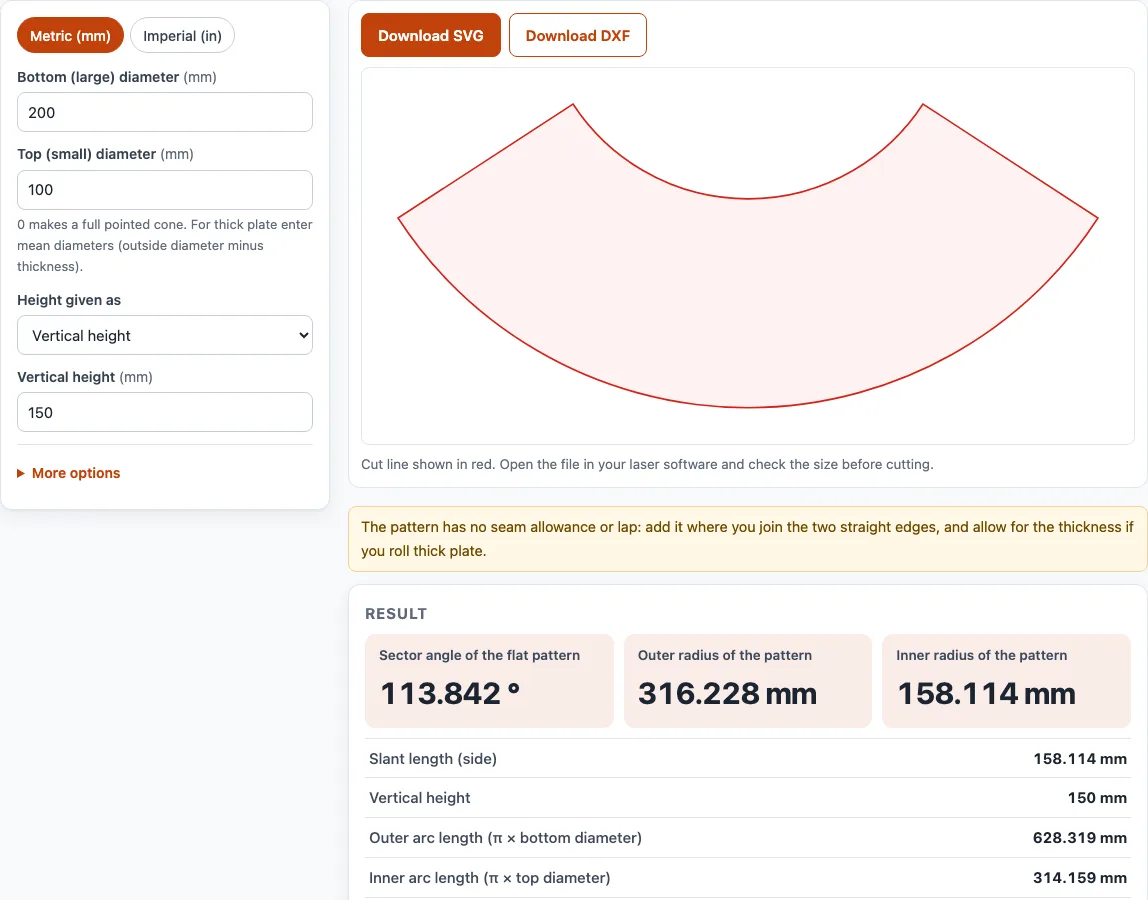
How to use the cone flat pattern calculator
- Choose your units with the Metric (mm) or Imperial (in) switch at the top of the tool.
- Type the Bottom (large) diameter of the cone.
- Type the Top (small) diameter. Enter 0 for a full pointed cone.
- Under Height given as, pick Vertical height or Slant length (along the side).
- Type the value in the field that appears: Vertical height or Slant length.
- Optional: open More options and enter Sheet width (optional) and Sheet length (optional). The tool warns you if the pattern does not fit on your sheet. Leave them at 0 to skip the check.
- Read the results: sector angle, outer and inner radius, slant length, vertical height, arc lengths, chord, rise, blank width and height, and half-angle.
- Check the preview, which shows the pattern to scale with a red cut line, and read the warnings under the results. Then click Download SVG or Download DXF. The DXF uses the same units you selected.
Print / save result prints the inputs, results, and calculation steps with the date. Use your browser’s Save as PDF option to keep a PDF copy. Copy link gives you a link that reopens the page with the same inputs. Reset clears the form.
Formula: how to make a cone out of sheet metal
A cone unrolls into a ring sector. Its shape depends on three numbers: the outer radius, the inner radius, and the sector angle. The tool calculates all three from the diameters and height you enter. Use the Bottom (large) diameter as D1, the Top (small) diameter as D2, and the vertical height as h.
The slant length is the side of the cone:
s = √(h² + ((D1 − D2) / 2)²)
The outer radius of the pattern is R1 = s × D1 / (D1 − D2). The inner radius is R2 = R1 − s. For a full pointed cone, set D2 = 0, so R1 equals s.
How to calculate a cone flat pattern
Find the slant length first, then the radii, then the angle. The sector angle is θ = 180° × D1 / R1. For a full cone with base radius r, this is the same as 360° × r / s.
Example: a cone with a 6-unit diameter and height 4 has radius 3 and slant 5. Its sector angle is 360° × 3 / 5 = 216°.
Example: a truncated cone with a 200 mm bottom, 100 mm top, and 150 mm height has slant 158.11 mm, outer radius 316.23 mm, inner radius 158.11 mm, and sector 113.84°.
A cone with a 90° included angle has height equal to its radius. It unrolls to a sector of 360° / √2, which is 254.56°.
How to mark out a cone pattern by hand
Draw the inner and outer radii from one centre point. From that centre, draw the sector angle between two straight lines. Cut out the ring sector, roll it into a cone, and join the two straight edges.
For thick plate, enter mean diameters: the outside diameter minus the thickness. The pattern has no seam allowance or lap, so add material where the straight edges meet.
Cone flat pattern chart
Full cones with a 100 mm base diameter, from the tool:
| Height | Slant | Sector angle | Blank (W × H) |
|---|---|---|---|
| 25 mm | 55.90 mm | 321.99° | 111.8 × 108.8 mm |
| 50 mm | 70.71 mm | 254.56° | 141.4 × 113.5 mm |
| 75 mm | 90.14 mm | 199.69° | 180.3 × 105.6 mm |
| 100 mm | 111.80 mm | 161.00° | 220.5 × 111.8 mm |
| 150 mm | 158.11 mm | 113.84° | 265.0 × 158.1 mm |
| 200 mm | 206.16 mm | 87.31° | 284.6 × 206.2 mm |
Taller cones need a smaller sector: the pattern gets narrower and longer as the height rises.
Sources
Data and rules used by this tool (checked October 2026):
Frequently asked questions
What is a cone flat pattern calculator?
It is a free online tool that converts a cone or truncated cone into its flat pattern. You get the sector angle, radii, and a to-scale drawing you can download.
Do I need to add seam allowance to the pattern?
Yes. The pattern has no seam allowance or lap, so add material along the straight edges where you join them.
Why is my pattern bigger than my sheet?
The pattern may be too large for one piece. Split it into two or more equal segments and weld or join them. The sheet-size warning appears when the pattern does not fit.
Can I make a cone with a given angle instead of a height?
The tool takes diameters and a height or slant length. For a given cone angle, work out the height from the radius first: height = radius ÷ tan(half-angle).
Can I use the results for commercial work?
Yes. Results and downloaded files can be used in quotes, client jobs, and products you sell, royalty-free and without attribution. Do not copy the site itself to build a competing service.
Does the tool show how to roll the cone?
No. The tool gives the flat shape and its dimensions only. Roll direction and rolling machines are not covered.
Related tools
- Bend allowance calculator: use it to work out bend allowance when your sheet metal part has bends as well as a cone.
- K-factor calculator: use it to find the K-factor for your bend calculations.
- Laser cut box generator: use it to make flat, cut-ready layouts for box-shaped parts.
- Gear generator: use it to create gear profiles for mechanical parts.
- Sheet metal gauge chart: use it to look up sheet thickness by gauge before you enter diameters.
- Steel plate weight calculator: use it to estimate the weight of the plate you will cut the pattern from.
- Laser cutting cost calculator: use it to estimate the cost of cutting your pattern on a laser.