Galvanized Steel Gauge Chart
Look up galvanized sheet thickness by gauge in inches and mm, coating included, or type a thickness to find the nearest gauge.
At a glance
Galvanized Steel Gauge Chart is a free browser tool that converts galvanized sheet gauge numbers to thickness in inches and mm and weight in lb/ft² and kg/m².
- Converts galvanized gauge numbers to thickness in inches and mm, plus weight in lb/ft² and kg/m².
- Calculations run in your browser, with no install or sign-up needed.
- Gauge 26 is 0.0217 in (0.551 mm); gauge 10 is 0.1382 in (3.510 mm).
- The full chart runs from gauge 8 (0.1681 in) to gauge 31 (0.0142 in).
- Weight uses a fixed density of 7.85 g/cm³ and does not model zinc coating class.
- Nothing typed into the tool is sent anywhere.
Sources: Sheet metal (Wikipedia) (checked 2026-10-15) · Material density chart (AIMS Industrial) (checked 2026-10-15)
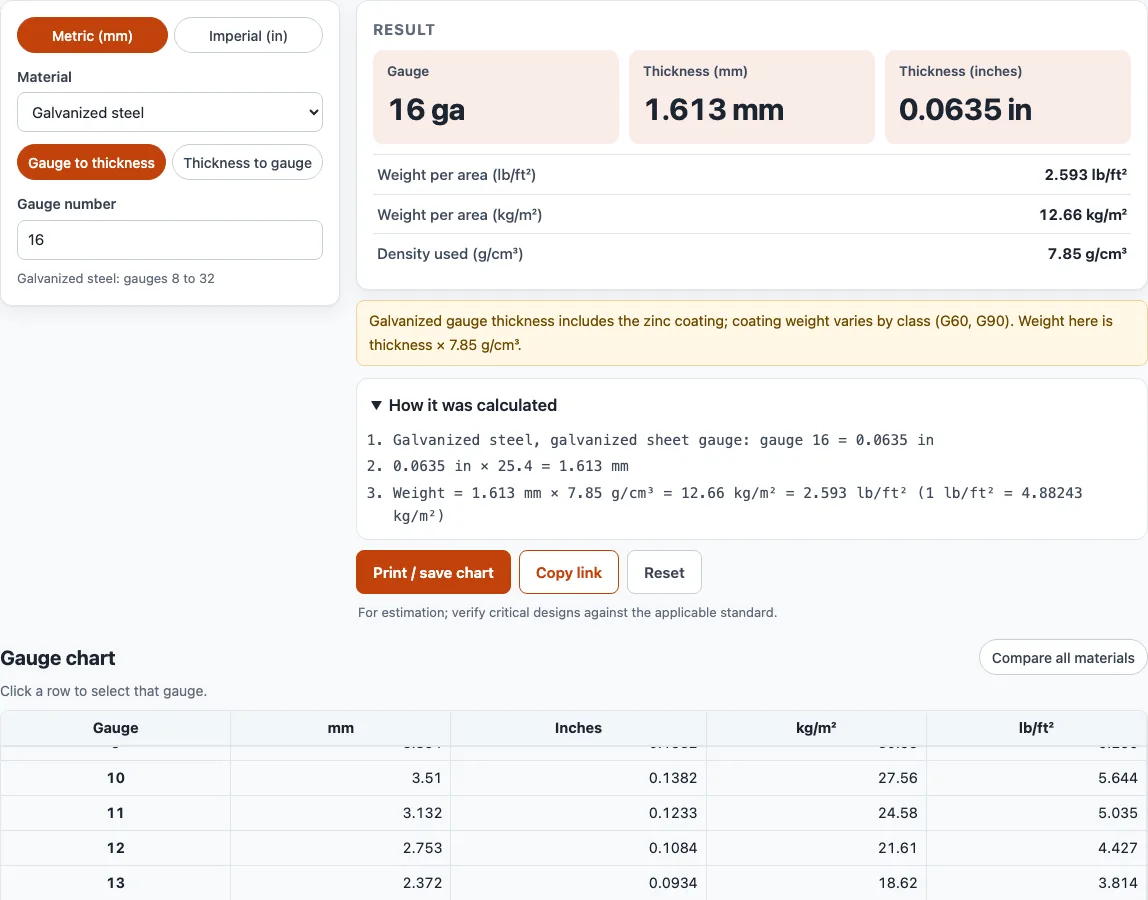
How to use the Galvanized steel gauge chart
- Check the Material setting. The page opens with Galvanized steel selected. If you need a different metal, choose it from the Material list, because each material uses its own gauge standard.
- To find the thickness of a gauge, select Gauge to thickness and type a gauge number, such as 26. The result shows the thickness in inches and mm, plus the weight per area in lb/ft² and kg/m².
- To find the gauge for a measured sheet, select Thickness to gauge and type the thickness in mm or inches. The result shows the nearest gauge, the difference, and the next nearest gauge.
- Use the Metric (mm) / Imperial (in) switch at the top of the tool to change the units.
- Scroll the full chart below the converter. Click any row to select that gauge.
- Select Compare all materials to show one table with the thickness of every material side by side for each gauge number.
Print / save chart prints your inputs, the result, the calculation steps, the date and the full galvanized chart as a clean table; choose Save as PDF in the print dialog to keep a PDF copy. Copy link gives you a link that reopens the page with the same inputs. Reset clears the inputs.
What thickness is 26 gauge galvanized steel?
26 gauge galvanized steel is 0.0217 inches thick, or 0.551 mm. Galvanized sheet uses its own gauge table, and this value includes the zinc coating. Gauge numbers run backwards, so 26 gauge is much thinner than 16 gauge, which is 0.0635 in (1.613 mm).
Is galvanized gauge thicker than steel gauge?
Yes. At the same gauge number, galvanized steel is about 0.0037 in (about 0.094 mm) thicker than uncoated steel, because the zinc coating adds to the total thickness. For example, 16 gauge steel is 0.0598 in (1.519 mm), while 16 gauge galvanized is 0.0635 in (1.613 mm). Steel sheet uses the Manufacturers’ Standard Gauge, which is defined by weight: 41.82 lb per square foot for each inch of thickness. Under that rule, 16 gauge steel weighs 2.5 lb/ft². Because the two materials use different tables, always check which material a gauge number refers to before you order or design with it.
Why do gauge numbers run backwards?
In every standard on this page, a higher gauge number means thinner sheet. Gauge 10 is 0.1382 in (3.510 mm), and gauge 26 is 0.0217 in (0.551 mm). If you are unsure, convert the number to a thickness first.
How is weight per area calculated?
The tool multiplies the thickness by the density of the material. For galvanized steel, it uses 7.85 g/cm³. For 16 gauge galvanized, that gives about 2.593 lb/ft². Conversions use 1 inch = 25.4 mm exactly, and 1 lb/ft² = 4.88243 kg/m².
Galvanized sheet metal gauge chart: common gauges
The galvanized steel sheet gauge chart below lists the gauges used most often for ducts, flashing, roofing panels and enclosures. Weight is thickness × 7.85 g/cm³, so treat it as an estimate: the zinc coating class changes the real figure slightly.
| Gauge | Inches | mm | lb/ft² |
|---|---|---|---|
| 10 | 0.1382 | 3.510 | 5.644 |
| 12 | 0.1084 | 2.753 | 4.427 |
| 14 | 0.0785 | 1.994 | 3.206 |
| 16 | 0.0635 | 1.613 | 2.593 |
| 18 | 0.0516 | 1.311 | 2.107 |
| 20 | 0.0396 | 1.006 | 1.617 |
| 22 | 0.0336 | 0.853 | 1.372 |
| 24 | 0.0276 | 0.701 | 1.127 |
| 26 | 0.0217 | 0.551 | 0.886 |
| 28 | 0.0187 | 0.475 | 0.764 |
The tool’s full chart runs from gauge 8 (0.1681 in) to gauge 31 (0.0142 in).
Galvanized sheet can also be bought by decimal thickness; when a supplier lists a coated thickness such as 0.0396 in, use Thickness to gauge to see that it matches 20 gauge exactly.
Sources
Data and rules used by this tool (checked October 2026):
Frequently asked questions
Does a higher galvanized gauge number mean thinner sheet?
Yes. Gauge numbers run backwards, so a higher number is thinner. For example, 20 gauge galvanized is 0.0396 in (1.006 mm), and 22 gauge is 0.0336 in (0.853 mm).
Why does the weight shown by the tool differ from my galvanized sheet?
The tool uses a fixed density of 7.85 g/cm³ and does not model the zinc coating class. Real weight depends on the coating class, such as G60 or G90, so the coated sheet you buy may weigh slightly more than the tool’s figure.
Are 26, 24 and 22 gauge galvanized steel common for roofing and ducts?
Yes, these gauges are often used for roofing, ducts, and flashing. Check the specification for your job, because the right gauge depends on the load, span, and local code.
Can I use these results for a quote or a critical design?
You can use the results and printouts in commercial work, such as quotes, client jobs, and products, with no attribution required. Results are for estimation. Verify critical designs against the applicable standard and the material supplier’s data.
What does G90 mean on galvanized steel?
G90 is a coating designation for hot-dip galvanized sheet: a total of 0.90 oz of zinc per square foot, counting both sides. G60 carries 0.60 oz/ft². The gauge thickness in this chart is the same for both; only the coating weight differs.
Related tools
- Sheet metal gauge chart: Use it to compare gauge tables when you are not sure which material you have.
- Stainless steel gauge chart: Use it when you are working with stainless sheet, which uses exact fractional thicknesses.
- Aluminum gauge chart: Use it for aluminum and other non-ferrous sheet, which uses the Brown & Sharpe gauge.
- Steel plate weight calculator: Use it to estimate the weight of a steel plate from its size and thickness.
- Metal weight calculator: Use it to estimate the weight of a metal part across different materials.
- Bend allowance calculator: Use it to find how much material a bend uses so you can size a flat blank.
- Laser cutting cost calculator: Use it to estimate cutting costs for a sheet before you request a quote.
- Bend radius calculator: Use it to choose an inside bend radius that suits your sheet thickness.