Gear Generator (Spur Gear SVG & DXF)
Set the teeth, module and pressure angle to draw an involute spur gear or a meshing pair, then download it as SVG or DXF.
At a glance
Gear Generator (Spur Gear SVG & DXF) is a free browser tool that draws involute spur gears, or meshing pairs, and downloads them as SVG or DXF files for laser cutting, CNC, or CAD.
- Draws involute spur gears as single gears or meshing pairs, downloadable as SVG or DXF.
- Free to use, runs in your browser, and needs no installation or sign-up.
- Does not make racks, internal, helical, bevel, or worm gears.
- Pressure angle options are 14.5°, 20° (standard), or 25°.
- A backlash of 0.05 to 0.15 mm suits laser kerf.
- Warns about undercut when teeth are below 2 ÷ sin²(pressure angle).
Sources: Gear (Wikipedia) (checked 2026-10-15) · Involute gear (Wikipedia) (checked 2026-10-15)
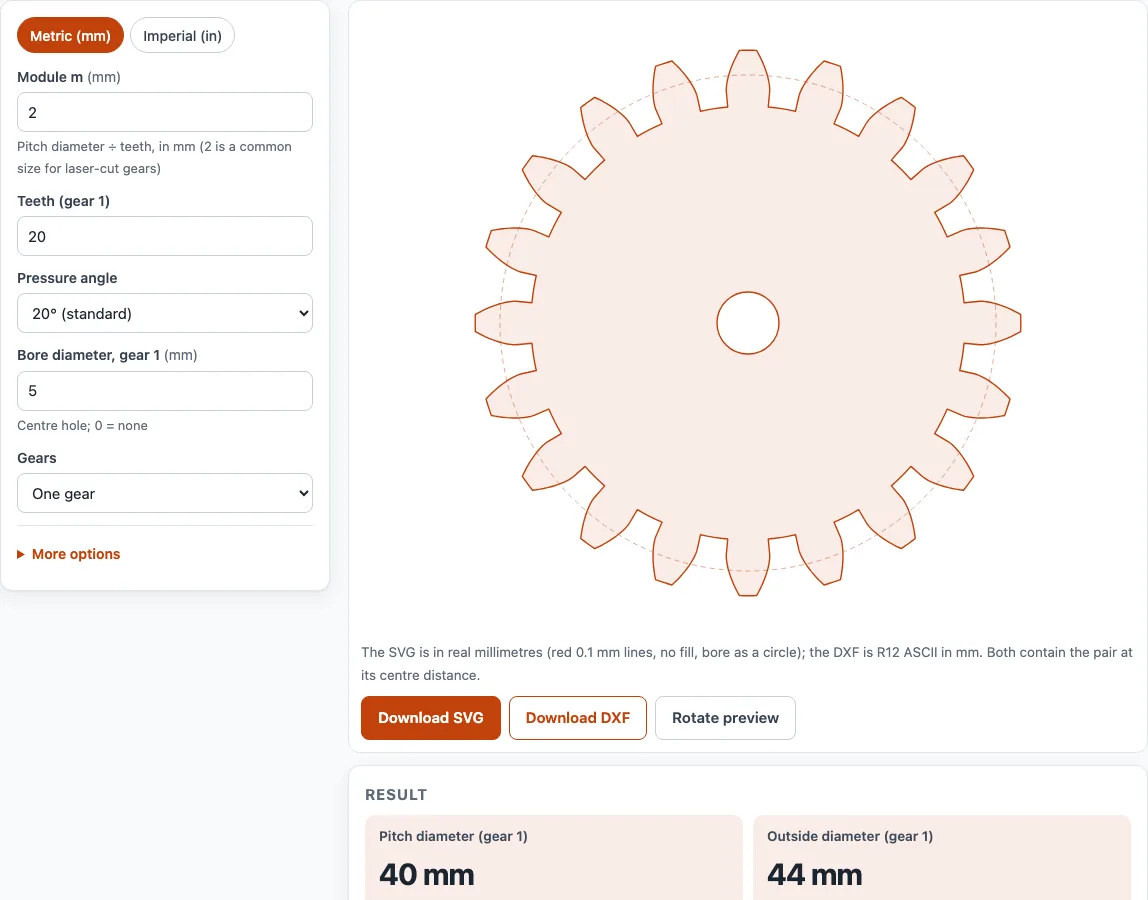
How to use the Gear generator
- Choose your units with the Metric (mm) / Imperial (in) switch at the top of the tool.
- Under Gears, select One gear or Meshing pair (two gears).
- Enter the Module m in mm (metric), or the Diametral pitch P in teeth per inch (imperial).
- Enter Teeth (gear 1). For a pair, also enter Teeth (gear 2).
- Select a Pressure angle: 14.5°, 20° (standard), or 25°.
- Set Bore diameter gear 1. Enter 0 for no bore. For a pair, set Bore diameter gear 2.
- Optional: open More options to set Backlash and Profile resolution. A backlash of 0.05 to 0.15 mm suits laser kerf.
- Check the live preview. Press Rotate preview to turn a meshing pair.
- Read the results: pitch, outside, root and base diameters, circular pitch, tooth thickness, and for a pair the centre distance, ratio and contact ratio. Check any warning about undercut or contact ratio.
- Press Download SVG or Download DXF to save the gear file, then import it into your laser, CNC or CAD software at 100% scale.
Under the result, Print / save result prints the inputs, results, calculation steps, and date. Use your browser’s Save as PDF option to make a PDF. Copy link reopens the page with the same inputs, and Reset clears them.
How to design a spur gear
A spur gear is designed by choosing a module (or diametral pitch) and a tooth count, then calculating its size with standard full-depth formulas. The pitch diameter is d = m × N, where m is the module and N is the number of teeth. For imperial gears, use N ÷ P instead.
The other dimensions follow from the pitch diameter. The addendum is m, so the outside diameter is d + 2m. The dedendum is 1.25 m, so the root diameter is d − 2.5m. The base circle is d × cos(pressure angle), and the involute flanks start from it. Circular pitch is π × m, and tooth thickness at the pitch circle is π × m / 2.
For example, module 2 with 20 teeth at 20° gives a pitch diameter of 40 mm, an outside diameter of 44 mm, a root diameter of 35 mm, a base circle of 37.588 mm, a circular pitch of 6.283 mm, and a tooth thickness of 3.142 mm. In imperial units, P 10 with 30 teeth gives a pitch diameter of 3.000 in, an outside diameter of 3.200 in, and a root diameter of 2.750 in.
The tool applies these formulas and draws the flanks as true involute curves computed from the base circle. Below the base circle, the flank runs straight to a plain root arc with no fillet.
What is gear module
Gear module is the metric size scale of a gear. It is the pitch diameter divided by the number of teeth, so m = d ÷ N, in mm. Every main tooth dimension is a multiple of the module. In imperial units, the matching value is the diametral pitch P, in teeth per inch, and module = 25.4 ÷ P.
Two gears mesh only if they share the same module (or diametral pitch) and the same pressure angle. For a meshing pair, the centre distance is m × (N1 + N2) / 2, and the ratio is N2 ÷ N1. With module 2, 20 teeth, and 40 teeth, the centre distance is 60 mm and the ratio is 2. The tool also reports a contact ratio, which for this pair is 1.635. A contact ratio below 1.2 means the pair may run roughly, and the tool shows a warning.
Sources
Data and rules used by this tool (checked October 2026):
Frequently asked questions
What is pressure angle?
The pressure angle is the angle at which the force between meshing teeth acts, and it sets the shape of the tooth’s involute curve. The tool offers 14.5°, 20° (standard), and 25°. Both gears in a pair must use the same pressure angle to mesh.
How do I calculate gear center distance?
For a meshing pair, centre distance = module × (teeth on gear 1 + teeth on gear 2) ÷ 2. For example, module 2 with 20 and 40 teeth gives 60 mm. The tool calculates this value and draws the pair at that spacing.
Why does the tool warn about undercut?
Undercut happens when a gear has too few teeth, and the tool warns when teeth are below 2 ÷ sin²(pressure angle). That is about 17 teeth at 20°, 32 at 14.5°, and 12 at 25°. Use more teeth to clear the warning.
Can I 3D print a gear from the SVG or DXF?
The tool does not export STL files. Import the gear SVG or DXF into a CAD program, extrude the profile to your thickness, and export an STL for your slicer.
Can I use the gear files in paid work?
Yes. Results and files may be used in commercial work, including quotes, client jobs, and products you sell. They are royalty-free, and no attribution is required. The only limit is copying the site itself as a competing service.
Are the results exact enough for a final design?
The results are for estimation. Verify critical designs against the applicable standard and your supplier’s data before you manufacture them.
Related tools
- Photo to laser engraving: use it to engrave a photo onto wood, acrylic, or other laser-safe material.
- Laser cutting cost calculator: use it to estimate the cost of a laser-cut job before you quote it.
- Laser cut box generator: use it to create cut files for a laser-cut box with finger joints.
- Sheet metal gauge chart: use it to look up sheet thickness by gauge number.
- Aluminum gauge chart: use it to compare aluminum sheet thicknesses by gauge.
- Bend allowance calculator: use it to work out how much material a bend adds to a flat pattern.
- Metal weight calculator: use it to estimate the weight of a metal part from its size and material.