Kerf Calculator
Pick what you need: cut spacing to bend a board, laser kerf offsets for parts and holes, or pieces per board with blade kerf.
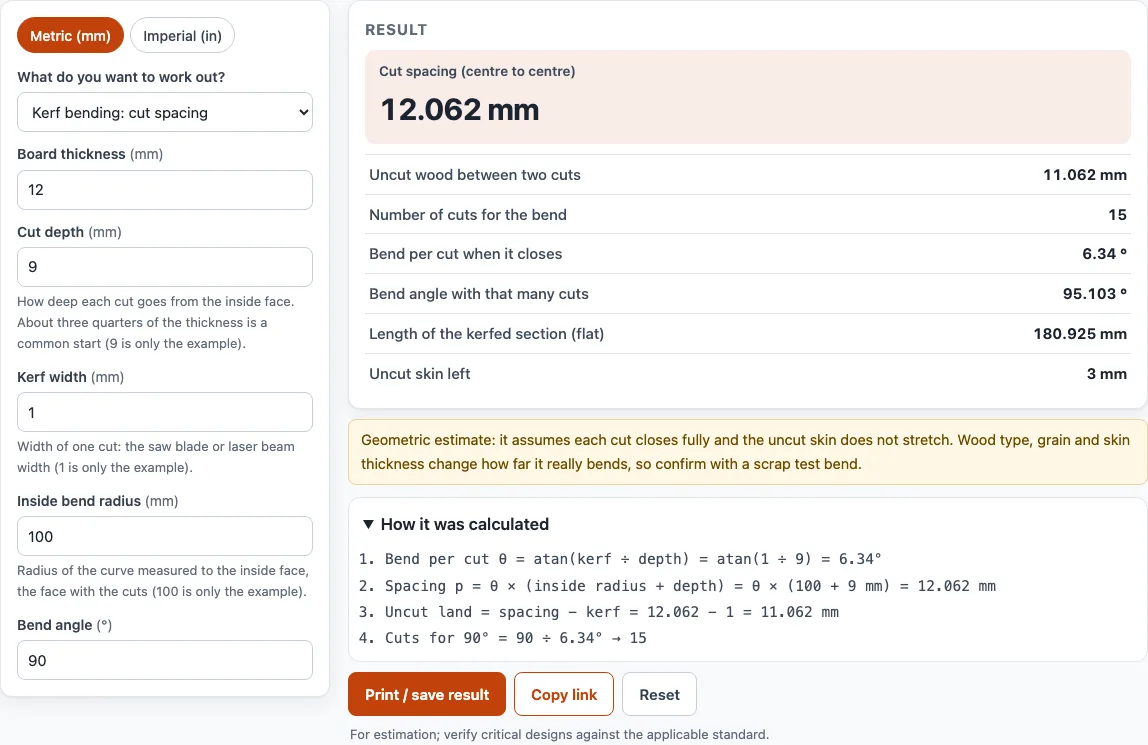
How to use the Kerf calculator
Choose a mode with “What do you want to work out?” and set the Metric (mm) / Imperial (in) switch at the top before you enter values.
- For bending, choose Kerf bending: cut spacing. Enter Board thickness, Cut depth (measured from the inside face of the bend), Kerf width, Inside bend radius (to the face with the cuts), and Bend angle.
- Read Cut spacing (centre to centre), Number of cuts for the bend, Bend per cut when it closes, and Uncut skin left.
- For laser parts, choose Laser kerf compensation. Enter Kerf (cut width) if you already know it. If not, enter Test square: size you drew and Test square: size you measured.
- Enter Part size you need (outside) and Hole size you need.
- Read Draw the part at (outside size) and Draw the hole at.
- For boards, choose Cut layout: pieces from a board. Enter Stock length, Piece length, Pieces you need, and Blade kerf.
- Read Pieces from one stock length, Stock lengths needed, and Leftover offcut.
The bending mode shows a warning if your cuts are shallower than about three quarters of the board thickness, or if the uncut skin is under 15 percent of the thickness. Treat either warning as a reason to change your values before you cut.
How far apart should kerf cuts be to bend wood?
Cut spacing is the centre-to-centre distance between neighbouring cuts. It equals the angle each cut closes multiplied by the inside radius plus the cut depth. Each cut closes when its two faces meet, which is a rotation of θ = atan(kerf width / cut depth) about the bottom of the cut.
Because the uncut skin keeps its length, spacing p = θ × (inside radius + cut depth), measured on the flat board. The land between cuts is p minus the kerf width, which is roughly kerf × radius / depth for small angles.
For a 12 mm board with 9 mm deep cuts, a 1 mm kerf, a 100 mm inside radius, and a 90 degree bend, each cut closes 6.34 degrees. The spacing is 12.06 mm, and 15 cuts are needed. Those cuts bend 95.1 degrees in total, which leaves 3 mm of skin.
This is a geometric estimate. It assumes every cut closes fully and the skin does not stretch. Wood type and grain direction change how far a board really bends, so test on a scrap piece first.
How do I measure laser kerf?
Measure it by cutting a test square and comparing the size you drew with the size you measured. Kerf equals the drawn size minus the measured size.
The beam removes half a kerf on each side of the path. A part cut on its exact outline ends up one kerf smaller, and a hole ends up one kerf larger. To correct for this, draw the part at the needed size plus the kerf, and draw the hole at the needed size minus the kerf.
For example, a 50 mm test square that measures 49.8 mm gives a kerf of 0.2 mm. A 100 mm part is then drawn at 100.2 mm, which is a 0.1 mm offset per side. A 10 mm hole is drawn at 9.8 mm.
Kerf changes with material, thickness, power, speed, and focus. Measure it on the material you plan to cut, not on a different material.
How many pieces fit on a board with saw kerf?
Count the kerf in every cut, but not after the last piece. The formula is pieces = floor((stock + kerf) / (piece + kerf)). Adding the kerf to the stock length first makes the arithmetic work, because each piece plus one cut uses piece + kerf.
For a 2400 mm board cut into 600 mm pieces with a 3 mm blade, (2400 + 3) / (600 + 3) = 3.98, so you get 3 pieces. A fourth piece would need 2409 mm. The leftover offcut is 594 mm. Six pieces need two boards.
Sources
Checked October 2026:
Frequently asked questions
What is kerf?
Kerf is the width of material removed by a saw blade or a laser beam during a cut. It is the gap left in the material after the cut.
What is a typical saw blade kerf?
A saw blade is often about 1/8 in (3 mm) thick, but blades vary. Check the blade you actually use before you rely on a typical figure.
Does a wider kerf make a board bend more easily?
Yes. With the other values fixed, a wider kerf closes each cut by a larger angle, so the same bend needs fewer cuts. The bend is still limited by the skin and by the wood, so check the result on a scrap piece.
Is the kerf bend spacing exact?
No. It is a geometric estimate that assumes each cut closes fully and the uncut skin does not stretch. Wood type, grain direction and skin thickness change how far a board really bends, so make a test bend on a scrap piece and adjust the spacing from what you see.
Why does the laser size change when the kerf is added?
The beam removes material on both sides of the path, so the finished part shrinks and the finished hole grows. Drawing the part larger and the hole smaller by the kerf cancels this change.
Related tools
- Laser cut box generator: Use it when you want to build a box from laser-cut panels.
- Laser cutting cost calculator: Use it to estimate what a laser cutting job will cost before you order.
- Bend allowance calculator: Use it for sheet metal bends made with a press brake rather than by kerf cuts.
- Laser spot size calculator: Use it to work out the beam spot size when you are setting up focus.
- Photo to laser engraving: Use it to turn a photo into an image for laser engraving.