Laser Cutting Cost Calculator
Enter cut length, pierces, cutting speed and your machine rate to get the cutting time, the job cost and the cost per part.
At a glance
Laser Cutting Cost Calculator is a free browser tool that estimates cut time, machine, setup, material and total job cost per part from cut length, pierces, cutting speed, machine rate and sheet price.
- Setup cost is setup minutes ÷ 60 × machine rate, and machine cost is total machine time × (machine rate + gas cost per hour).
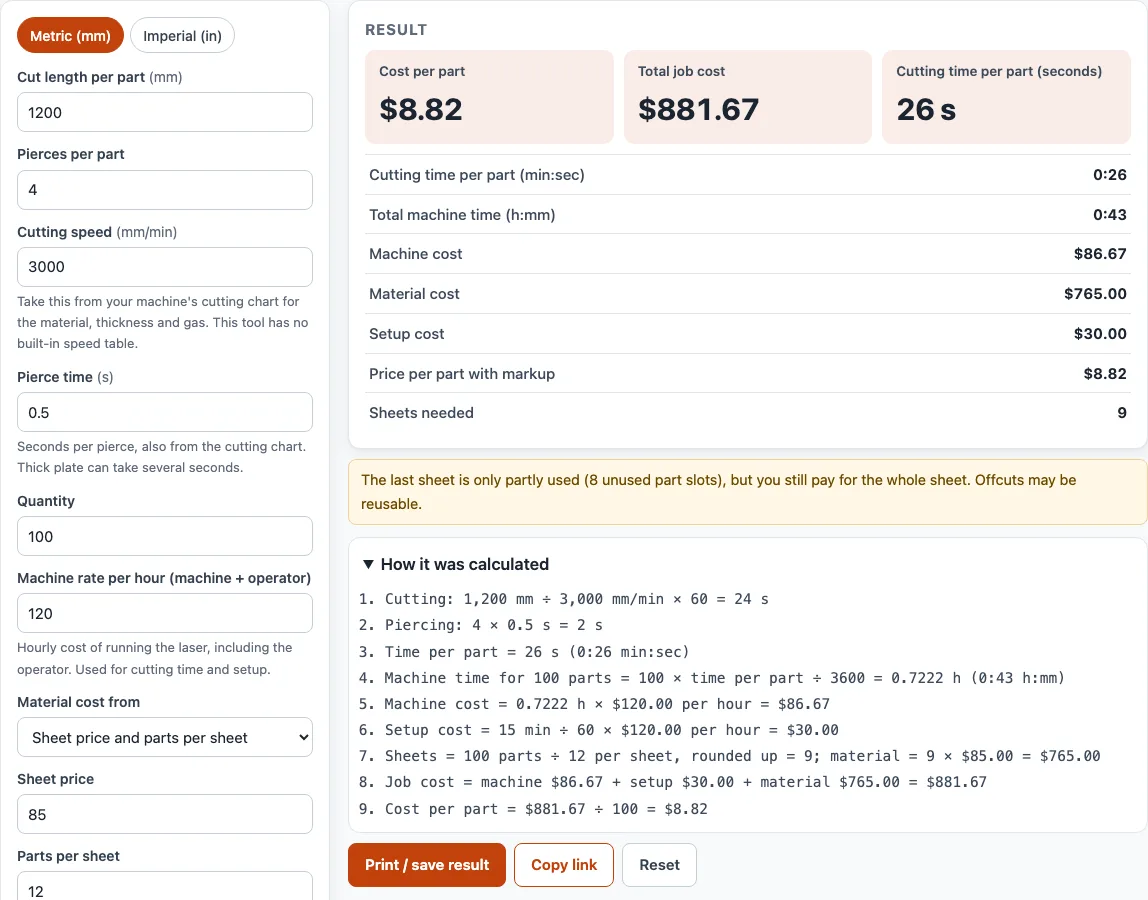
- A 1,200 mm cut at 3,000 mm/min with 4 pierces at 0.5 s each takes 26 s per part.
- For 100 parts at $120/h, machine time of 0.7222 h costs $86.67.
- With 12 parts per sheet, 9 sheets at $85 each give $765.00 of material, and the job cost of $881.67 is $8.82 per part.
- The tool has no built-in cutting speed table, so every speed and rate is your own input from your machine's chart.
Sources: Laser cutting (Wikipedia) (checked 2026-10-15)
How to use the Laser cutting cost calculator
- Pick your units with the Metric (mm) or Imperial (in) switch at the top of the tool.
- Enter the cut length per part. This is the total perimeter of all contours: the outer outline plus every hole. CAD or CAM software usually reports it.
- Enter the pierces per part, counting one pierce for each separate contour.
- Enter the cutting speed and pierce time from your own machine’s cutting chart for the material, thickness and gas. The tool has no built-in speed table.
- Enter the quantity of parts.
- Enter the machine rate per hour, including the operator.
- Under “Material cost from”, choose either a sheet price with parts per sheet, or a cost per part.
- Enter the setup time per job in minutes, the markup percentage and your currency symbol.
- Open More options if needed to add assist gas cost per hour, rapid-travel length per part and rapid travel speed.
- Read the results: cut time per part, total machine time, machine, setup and material costs, total job cost, cost per part, price per part and sheets needed.
Warnings flag a missing pierce time, a partly used last sheet or a zero machine rate. Use “Print / save” to print a sheet with your inputs, results, calculation steps and the date. In the print dialog, choose Save as PDF to keep a copy. “Copy link” makes a link that reopens the page with the same inputs, and “Reset” clears them.
How to calculate laser cutting cost
Laser cutting cost is the machine time, setup time and material for a job, added together and divided by the quantity. The machine part is total machine hours multiplied by the machine rate plus the gas cost per hour, and the setup part is setup minutes divided by 60 multiplied by the machine rate.
- Machine cost = total machine time (hours) × (machine rate + gas cost per hour)
- Setup cost = setup minutes ÷ 60 × machine rate
- Sheets = quantity ÷ parts per sheet, rounded up
- Material = sheets × sheet price
- Job cost = machine + setup + material
- Cost per part = job cost ÷ quantity
- Price per part = cost per part × (1 + markup)
How is laser cutting priced
Laser cutting is priced per part, with the cost spread across the quantity. The main driver is machine time, because the machine is billed by the hour while it cuts. Setup and material are added to that, and a markup is applied at the end to reach the selling price.
Here is a worked example from the tool. A part has a 1,200 mm cut length, cut at 3,000 mm/min, which is 24 s. It has 4 pierces at 0.5 s each, which adds 2 s, for 26 s per part. For 100 parts, machine time is 0.7222 h (0:43), costing $86.67 at $120/h. Setup of 15 minutes costs $30.00. With 12 parts per sheet, 9 sheets are needed at $85 each, so material is $765.00. The job cost is $881.67, which gives $8.82 per part.
How long does laser cutting take
Cutting time per part is the cut length divided by the cutting speed, plus the pierces multiplied by the pierce time, plus rapid-travel length divided by rapid speed if you use it. Multiply that by the quantity to get total machine time. Piercing can take a large share of the time on parts with many small holes, and thick plate can take several seconds per pierce, so count pierces carefully.
Sources
No cutting speeds, machine rates or material prices are built in: every rate is your input (from your machine’s cutting chart and your own costs), and the tool only applies the arithmetic shown in the steps.
Frequently asked questions
Where do I get the cutting speed for my estimate?
Use the cutting chart from your own machine for the material, thickness and assist gas. Speeds differ with machine power, gas and nozzle, so a chart from another machine may give a wrong result.
Can I use results from this tool in a client quote?
Yes. Results and printouts can be used in commercial work such as quotes, client jobs and products, with no attribution required. Treat them as estimates, and check critical designs against the applicable standard and your material supplier’s data.
Why does the sheet count jump when I change the quantity?
Sheets are calculated as quantity divided by parts per sheet, rounded up. One extra part can therefore add a whole sheet to the material cost, and the last sheet is often only partly used.
Can I save or share my inputs and results?
Yes. “Print / save” creates a printout with your inputs, results, calculation steps and the date. “Copy link” gives you a link that reopens the tool with the same inputs.
Does the calculator include assist gas?
Yes, if you want it to. Open More options and enter the assist gas cost per hour (nitrogen, oxygen or air); it is added to the machine rate while the laser cuts. Leave it at 0 if your machine rate already covers gas.
Related tools
- Laser cut box generator: use it to create box designs before you estimate the cutting job.
- Photo to laser engraving: use it to prepare images for engraving jobs.
- Gear generator: use it to generate gear shapes you may want to cut.
- Sheet metal gauge chart: use it to look up sheet thickness when choosing material.
- Steel plate weight calculator: use it to estimate plate weight for shipping or material purchasing.
- Metal weight calculator: use it to estimate the weight of metal parts across different materials.
- Bend allowance calculator: use it when your cut parts also need bending.
- Stainless steel gauge chart: use it to check stainless steel thickness for your cutting settings.
- Laser spot size calculator: use it to size the focused spot and depth of focus.
- Kerf calculator: use it to allow for the width of the cut: part and hole offsets, kerf-bend spacing and cut layout.