Laser Spot Size Calculator
Enter the wavelength, beam quality M², beam diameter and lens focal length to get the focused spot size and depth of focus.
The laser spot size calculator estimates how small a laser beam can be focused and how far the focus stays sharp. You enter the laser type or wavelength, the beam quality M², the beam diameter at the lens and the lens focal length, and it returns the focused spot diameter, the Rayleigh length, the depth of focus and the full divergence angle. It is a free tool that runs in your browser, with no sign-up, and nothing you type is sent anywhere.
The results come from ideal Gaussian-beam theory, so they show the smallest spot your optics can produce. They are estimates, not a guaranteed cut width. The tool also reports the f-number, and with a laser power it adds the power density in the spot. Use it to choose a lens for cutting, engraving or marking.
At a glance
Laser Spot Size Calculator estimates the focused spot diameter, Rayleigh length, depth of focus and divergence angle of a laser beam from wavelength, M², beam diameter and lens focal length.
- Free browser tool with no sign-up; nothing you type is sent anywhere.
- Returns focused spot diameter, Rayleigh length, depth of focus and full divergence angle.
- Results are ideal Gaussian-beam estimates, not a guaranteed cut width.
- Example: CO2 at 10.6 µm, M² 1, 10 mm beam and 127 mm lens gives about 171 µm.
- Does not set cutting speed or laser power.
- CO2 option uses 10600 nm; a warning appears when focal length is under 3 times beam diameter.
Sources: Gaussian beam (Wikipedia) (checked 2026-10-15) · Fiber Lasers in Material Processing (IntechOpen) (checked 2026-10-15)
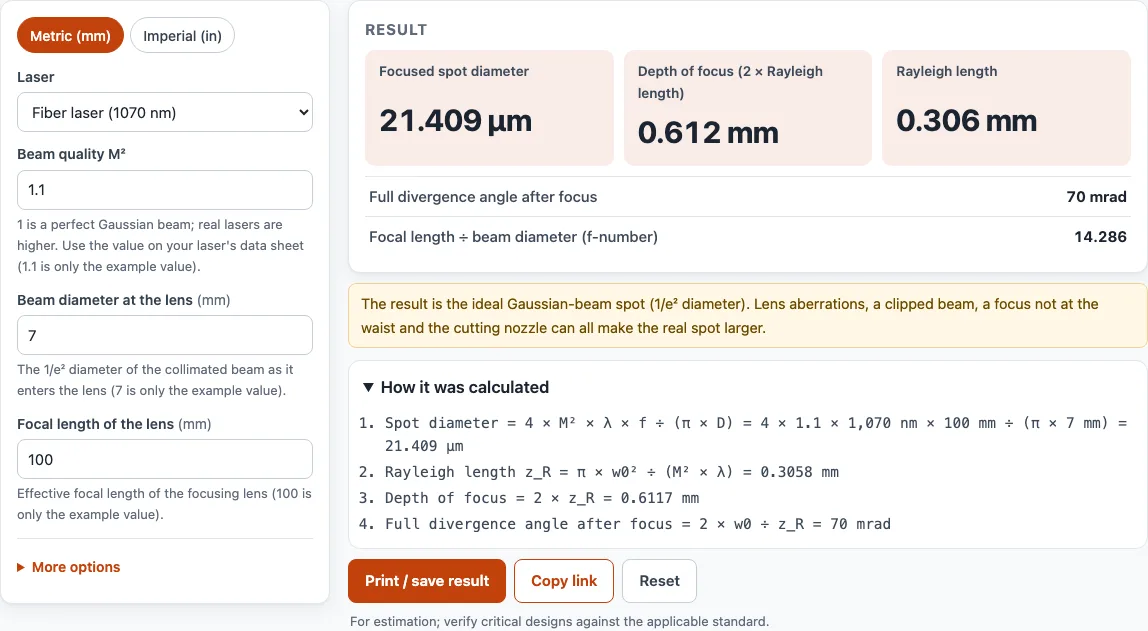
How to use the laser spot size calculator
- Choose your units with the ‘Metric (mm)’ or ‘Imperial (in)’ switch at the top of the tool.
- Pick your laser from the ‘Laser’ list, such as CO2 laser 10600 nm or Fiber laser 1070 nm. If yours is not listed, choose ‘Other wavelength’ and type its wavelength in the ‘Wavelength (nm)’ box.
- Enter the ‘Beam quality M²’ from your laser’s data sheet. A value of 1 is a perfect Gaussian beam.
- Enter the ‘Beam diameter at the lens’, which is the collimated beam size where it meets the lens.
- Enter the ‘Focal length of the lens’.
- Optional: open ‘More options’ and enter ‘Laser power (W, optional)’ to get the power density results.
- Read the results: focused spot diameter, depth of focus, Rayleigh length, full divergence angle and focal length ÷ beam diameter. Check the warnings under them, and the steps that show each formula with your numbers.
Under the result, ‘Print / save result’ prints your inputs, results, calculation steps and the date. Use your browser’s Save as PDF option to keep a PDF copy. ‘Copy link’ creates a link that reopens the page with the same inputs, which is useful for sharing a setup with a colleague. ‘Reset’ clears the form so you can start a new calculation.
Spot size of laser beam
The spot size of a laser beam is the diameter of the focused beam at its narrowest point, called the beam waist. This tool reports the 1/e² diameter, which holds about 86.5 % of the beam power. A smaller spot concentrates the same power into a smaller area, so the power density rises. The average power density is P ÷ (π × w0²), where w0 is the spot radius, and the peak of a Gaussian beam is twice that average.
How to calculate laser spot size
The focused spot diameter is d0 = 4 × M² × λ × f ÷ (π × D). Here λ is the wavelength, f is the focal length, D is the beam diameter at the lens and M² is the beam quality. Use the same length unit for λ, f and D; the spot comes out in that unit.
For example, a CO2 laser at 10.6 µm with M² = 1, a 10 mm beam and a 127 mm lens gives 4 × 10.6 × 127 ÷ (π × 10) ≈ 171 µm. Doubling M² doubles the spot. A shorter focal length or a larger beam diameter makes the spot smaller.
What is depth of focus
Depth of focus is the distance along the beam over which the spot stays close to its smallest size. It equals twice the Rayleigh length, and the Rayleigh length is z_R = π × w0² ÷ (M² × λ). The Rayleigh length is the distance from the waist at which the beam’s cross-section area has doubled.
Depth of focus is proportional to the square of the spot size, so halving the spot cuts the depth of focus to a quarter. In the CO2 example above, the Rayleigh length is 2.18 mm and the depth of focus is 4.35 mm. This trade-off is why a fast lens gives a tight spot but needs the material to sit very precisely at the focus.
Example spot sizes
Ideal Gaussian-beam values from the tool. The M² and beam sizes are example inputs, not machine data:
| Setup | Lens | Spot (1/e²) | Depth of focus |
|---|---|---|---|
| CO2, M² 1.0, 10 mm beam | f 50.8 mm | 68.6 µm | 0.70 mm |
| CO2, M² 1.0, 10 mm beam | f 63.5 mm | 85.7 µm | 1.09 mm |
| CO2, M² 1.0, 10 mm beam | f 127 mm | 171.4 µm | 4.35 mm |
| Fiber 1070 nm, M² 1.1, 7 mm beam | f 100 mm | 21.4 µm | 0.61 mm |
| Fiber 1070 nm, M² 1.1, 7 mm beam | f 200 mm | 42.8 µm | 2.45 mm |
Sources
Data and rules used by this tool (checked October 2026):
- Wikipedia, Beam parameter product (BPP = M² × λ / π, M²)
- Wikipedia, Gaussian beam (Rayleigh range, peak intensity 2P / πw0²)
- Wikipedia, List of laser types (CO2 10.6 µm, Nd:YAG 1.064 µm) and Nd:YAG laser (532 and 355 nm harmonics)
- Wikipedia, Laser diode (445 nm blue diode)
- IntechOpen, ytterbium fiber lasers for material processing (1,060–1,080 nm)
Frequently asked questions
Which wavelength should I enter for a CO2 laser?
Choose the CO2 laser option, which uses 10600 nm (10.6 µm), the typical CO2 wavelength. Fiber and Nd:YAG lasers are about 1.06 to 1.07 µm, so pick their listed options or ‘Other wavelength’ for anything not on the list.
Why is my real spot bigger than the result?
The result is the ideal Gaussian spot. Lens aberrations, a clipped beam, a focus that is not at the waist, a nozzle and a very fast lens can all enlarge the real spot. The tool warns when the focal length is under 3 times the beam diameter.
Where do I find the M² value for my laser?
M² is listed on your laser’s data sheet. The value 1.1 in the tool is only an example, so do not rely on it for your own machine.
Does this calculator choose cutting speed or power?
No. The tool does not set cutting speed or laser power. For the cost of a job, use the Laser cutting cost calculator linked below.
Can I use the results in paid work?
Yes. Results and files may be used in commercial work, such as quotes, client jobs and products you sell, royalty-free with no attribution required. The only limit is copying the site itself as a competing service. Results are estimates, so check critical designs against the applicable standard.
Related tools
- Laser cutting cost calculator: use it to estimate what a cutting job costs once you have your setup.
- Photo to laser engraving: use it to turn a photo into an engraving file.
- Laser cut box generator: use it to make box panels ready for laser cutting.
- Gear generator: use it to create gear designs for cutting or printing.
- Sheet metal gauge chart: use it to look up sheet thicknesses by gauge number.
- Bend allowance calculator: use it to work out the flat length needed for a bent part.