Pipe Weight Calculator
Pick a pipe size and schedule, or enter your own OD and wall, to get the weight per foot or metre and the weight of each length.
At a glance
Pipe Weight Calculator is a free browser tool that works out the weight of steel, stainless, copper or custom-density pipe from its NPS size and schedule, or from any outside diameter and wall, with length and piece count.
- Calculates pipe weight in kilograms or pounds from NPS size, schedule, or any outside diameter and wall.
- Covers NPS sizes from 1/8 to 24, with schedules listed per size; stainless uses 5S, 10S, 40S and 80S.
- Stainless 304 and 316 use a density of 8.00 g/cm³; copper uses 8.94 g/cm³ (C110).
- Calculated from nominal wall thickness; ASTM A53 and A106 walls can be up to 12.5% thinner.
- Free, runs in your browser, and needs no sign-up.
Sources: Pipe (fluid conveyance) (Wikipedia) (checked 2026-10-15) · Nominal Pipe Size (Wikipedia) (checked 2026-10-15) · Material density chart (AIMS Industrial) (checked 2026-10-15)
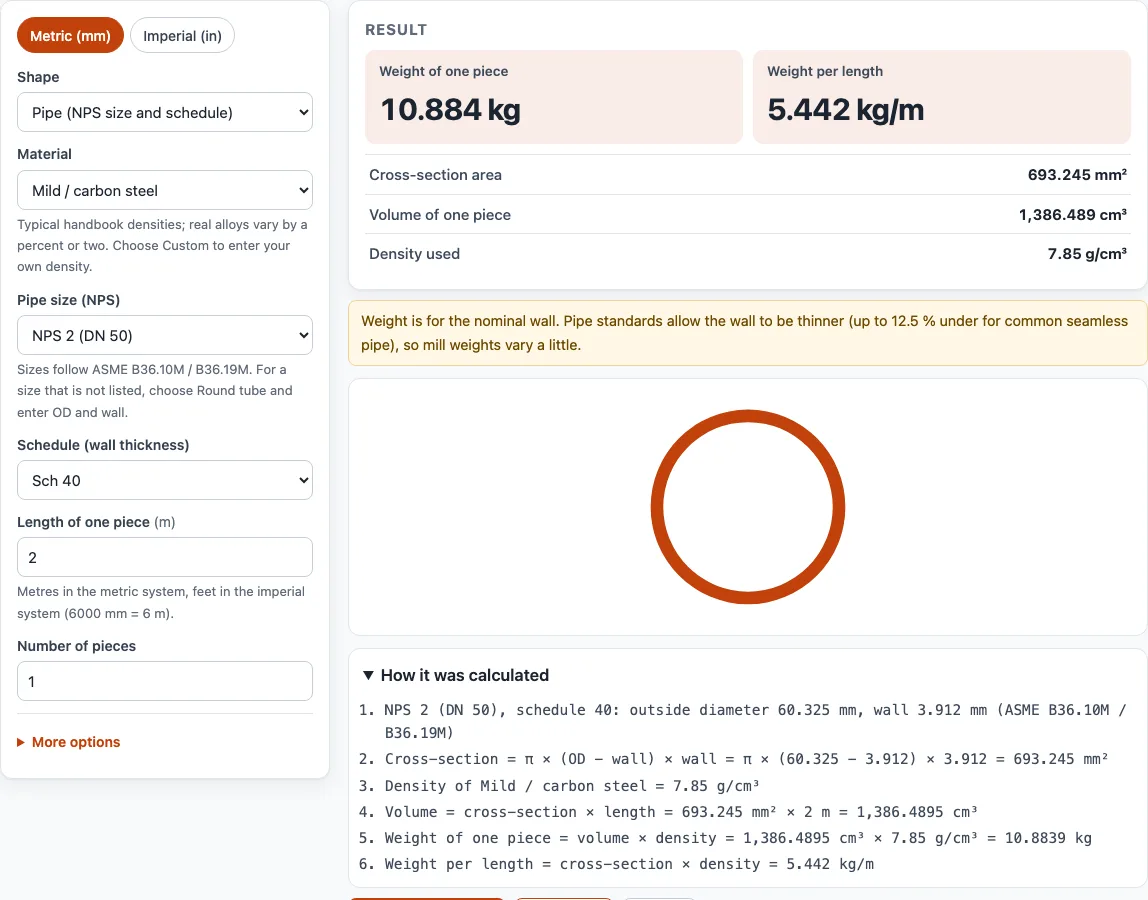
How to use the Pipe weight calculator
- Choose your units with the Metric (mm) / Imperial (in) switch at the top of the tool.
- Keep the shape set to Pipe (NPS size and schedule). The page opens with this shape and mild steel selected.
- Choose the material. Pick a steel, stainless, aluminum, copper or other option from the list, or choose Custom density and type your own value.
- Select the NPS size, from 1/8 to 24. The schedules listed are the ones that exist for that size.
- Select the schedule. For stainless, the list shows 5S, 10S, 40S and 80S.
- Enter the length of one piece in metres or feet.
- Enter the Number of pieces.
- Optional: open More options and type a price per kg or per lb to get a material cost.
- Read the results: weight of one piece, total weight, weight per length (kg/m or lb/ft), cross-section area, volume and the density used. The cross-section sketch and calculation steps are shown below them.
Use Print / save result to print the inputs, results, calculation steps and date. For a PDF, choose Save as PDF in your browser’s print dialog. Copy link gives you a link that reopens the page with the same inputs, which is useful for sending a calculation to a colleague. Reset clears the inputs so you can start again.
How to calculate pipe weight
Pipe weight is the volume of metal in the pipe wall multiplied by the metal’s density. Start by finding the area of the steel ring, which is the outside circle minus the inside circle. Then multiply that area by the length to get the volume, and by the density to get the weight.
For example, take NPS 2 Schedule 40 steel. Its outside diameter is 2.375 in and its wall is 0.154 in, so the inside diameter is 2.067 in. The ring area is π/4 × (2.375² − 2.067²), which is about 1.074 in². Steel weighs 0.2836 lb per cubic inch. Multiply 1.074 in² by 0.2836 lb/in³ to get 0.305 lb per inch of length, then by 12 to get 3.66 lb per foot. The tool shows 3.657 lb/ft.
What is the formula for pipe weight
The general formula is weight = cross-section area × length × density. For a pipe, the cross-section area is π/4 × (OD² − ID²), where OD is the outside diameter and ID is the inside diameter. Because the inside diameter equals the outside diameter minus twice the wall thickness, the formula can be written as π × wall × (OD − wall).
For steel with dimensions in inches and weight in pounds per foot, this simplifies to:
weight per foot = 10.69 × (OD − wall) × wall
The number 10.69 comes from π multiplied by steel’s weight per square inch of section per foot of length.
Schedule changes only the wall. The outside diameter stays the same for every schedule of one NPS size, so a higher schedule number gives a thicker wall and a heavier pipe. For NPS 1 Schedule 40, with an OD of 1.315 in and a wall of 0.133 in, the formula gives 10.69 × 1.182 × 0.133, or about 1.68 lb/ft.
Stainless and other metals
Stainless steel pipe uses the same outside diameters, with the “S” schedules (5S, 10S, 40S, 80S) from ASME B36.19M. Pick Stainless steel 304 or 316 as the material and the tool applies its density (8.00 g/cm³ for both, from a supplier’s published density chart), so stainless pipe comes out about 2% heavier than carbon steel of the same size and schedule.
Sources
Data and rules used by this tool (checked October 2026):
Frequently asked questions
How much does schedule 40 pipe weigh per foot?
NPS 2 Schedule 40 steel weighs 3.657 lb per foot, so a 20 ft length weighs 73.1 lb. Schedule 40 weight changes with the NPS size, so select your size in the tool to get the exact figure. For NPS 4 Schedule 40 steel, the tool gives 16.07 kg/m.
Does this calculator work for copper pipe?
Yes. Copper tube is not in the pipe picker, so choose the Round tube shape, enter the outside diameter and wall thickness, and select copper, which uses a density of 8.94 g/cm³ (C110).
Can I estimate the weight of PVC or HDPE pipe?
Yes, if you know the material’s density. Choose Custom density, type the density, and enter the pipe’s dimensions using the Round tube shape. Concrete pipe dimensions are not built into the tool.
How close is the result to the real weight of a pipe?
Pipe weight is calculated from the nominal wall thickness. ASTM A53 and A106 allow the wall to be up to 12.5% thinner than nominal, so the actual weight can be lower. Results are for estimation. Check critical designs against the applicable standard and your supplier’s data.
What does the schedule number mean?
The schedule is a wall thickness class. For one NPS size, a higher schedule number means a thicker wall, a smaller inside diameter and a heavier pipe per foot. The outside diameter does not change.
Can I use the results in quotes or products I sell?
Yes. Results and files can be used in commercial work, such as quotes, client jobs and products you sell. They are royalty-free and need no attribution. The only limit is copying the site itself as a competing service.
Related tools
- Steel plate weight calculator: use it to work out the weight of flat steel plate and sheet by width, thickness and length.
- Steel beam weight calculator: use it for I-beam, H-beam and W-beam sections when you need the weight per length.
- Metal weight calculator: use it to compare bars, tubes, angles and channels across many shapes and materials.
- Sheet metal gauge chart: use it to look up the thickness of sheet metal by gauge number before you calculate its weight.
- Stainless steel gauge chart: use it to convert stainless steel gauge numbers to thickness.
- Aluminum gauge chart: use it to convert aluminum gauge numbers to thickness.
- Laser cutting cost calculator: use it to estimate the cost of cutting your parts once you know their weight and size.
- Bend allowance calculator: use it to find how much material a bend takes up when you are planning a bent part.
- Tube weight calculator: use it for tube given by outside size and wall.