Stainless Steel Gauge Chart
Look up the thickness of any stainless sheet gauge in inches, mm and exact fractions, or type a thickness to find the nearest gauge.
The stainless steel gauge chart is a free converter that gives the thickness of any stainless steel sheet gauge in inches and millimeters, along with its weight per square foot and per square meter. It also works in reverse, turning a thickness you measure into the nearest gauge number. The tool runs in your browser, and you don’t need to sign up.
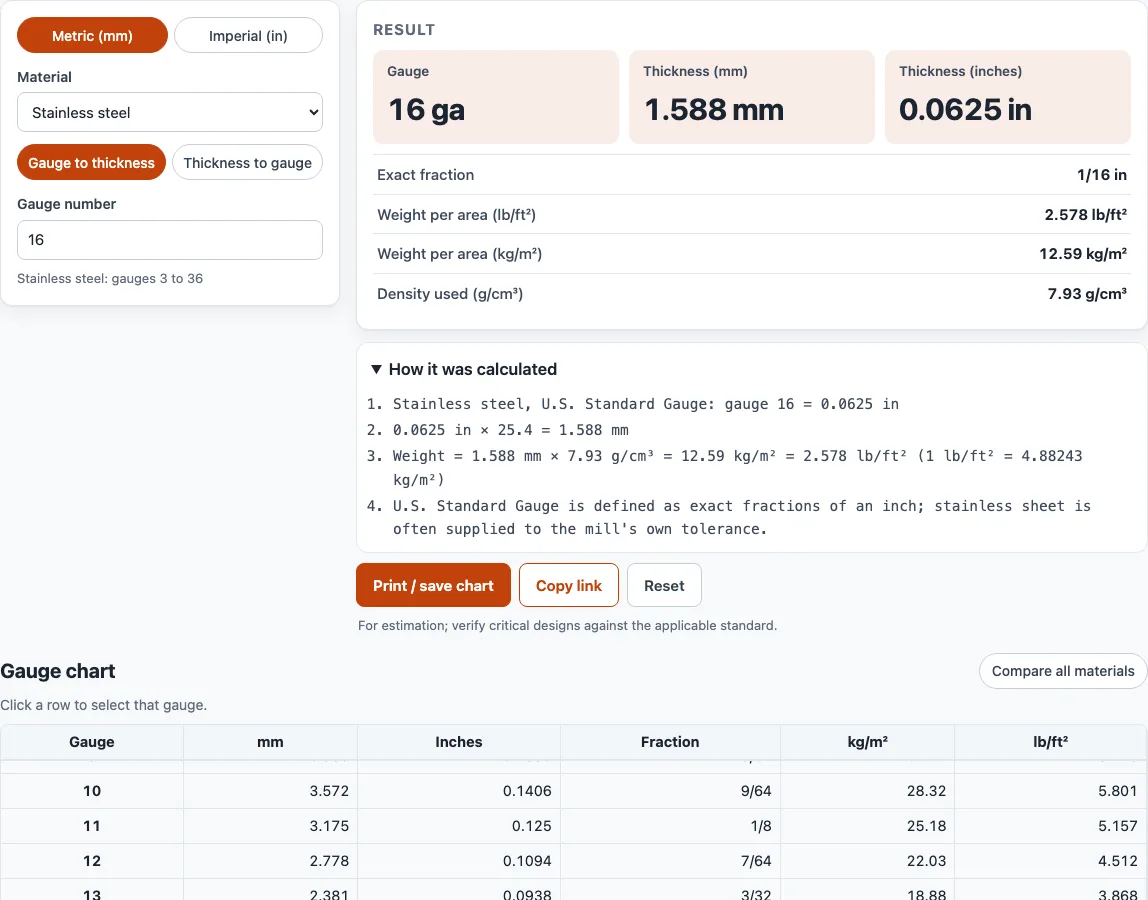
The page opens with Stainless steel selected, and the full stainless chart sits below the converter, so you can look up a gauge without typing anything. Stainless sheet is usually listed by the U.S. Standard Gauge, so the numbers here match the thicknesses most suppliers quote. Use this page when you are checking a drawing, estimating material weight, or comparing sheet sizes for a quote.
At a glance
Stainless Steel Gauge Chart is a free browser tool that converts stainless sheet gauge numbers to inches, mm and weight per square foot, and measured thickness back to the nearest gauge.
- The tool is free, runs in your browser, and needs no sign-up.
- Gauge to thickness shows inches, mm, lb/ft² and kg/m² for a gauge number.
- Stainless gauges use exact U.S. Standard Gauge fractions of an inch.
- The chart in the tool runs from 3 to 36 gauge.
- Weight is calculated with 8.00 g/cm³ for 304 stainless; 316 uses the same thicknesses.
- Nothing you type is sent to a server.
Sources: Sheet metal (Wikipedia) (checked 2026-10-15) · Material density chart (AIMS Industrial) (checked 2026-10-15)
How to use the Stainless Steel Gauge Chart
- Check the Material box. It opens on Stainless steel. Pick another material only if you need a different gauge standard.
- Choose a mode. Select Gauge to thickness to type a gauge number, or Thickness to gauge to type a measured thickness.
- Type your value. For gauge to thickness, enter a number such as 16. For thickness to gauge, enter a value in mm or inches.
- Read the result. Gauge to thickness shows the thickness in inches and mm, plus the weight in lb/ft² and kg/m². Thickness to gauge shows the nearest gauge, the difference, and the next nearest gauge.
- Use the Metric (mm) / Imperial (in) switch at the top of the tool to change units.
- Scroll the chart below the converter. Click any row to select that gauge. Stainless rows also show the exact fraction.
- Click Compare all materials to see one table with the thickness of each material side by side for every gauge number.
Print / save chart prints your inputs, the result, the calculation steps, the date and the full stainless chart as a clean table. Use your browser’s Save as PDF option to keep a copy. Copy link gives you a link that reopens the page with the same inputs, which is useful when you want to send a specific gauge to a colleague. Reset clears the inputs.
What thickness is 16 gauge stainless steel?
16 gauge stainless steel is 0.0625 inch (1/16 inch), which is 1.587 mm thick. Stainless sheet is usually listed by the U.S. Standard Gauge (1893), and in that system 16 gauge is defined as exactly 1/16 inch.
Gauge numbers run backwards: a higher number means thinner sheet. Under the U.S. Standard Gauge, the thicknesses are exact fractions of an inch. For example, 11 gauge is 1/8 inch, 14 gauge is 5/64 inch, 18 gauge is 1/20 inch, 20 gauge is 3/80 inch, and 24 gauge is 1/40 inch. The tool uses these exact values, so you can check any row against the fraction shown in the chart.
Weight comes from thickness and density. The tool multiplies thickness by density, using 8.00 g/cm³ for 304 stainless. On that basis, 16 gauge 304 weighs 2.601 lb/ft² (12.70 kg/m²). 316 stainless uses the same gauge thicknesses, and the supplier density chart the tool uses lists it at the same 8.00 g/cm³.
Is stainless steel gauge the same as steel gauge?
No. The same gauge number gives a different thickness in each material because each one uses its own standard. Steel sheet uses the Manufacturers’ Standard Gauge, which is defined by weight: 41.82 lb per square foot for each inch of thickness. That makes 16 gauge steel 2.5 lb/ft² and 0.0598 inch thick.
At 16 gauge, the four materials compare as follows:
- Steel: 0.0598 in (1.519 mm)
- Galvanized steel: 0.0635 in (1.613 mm). The zinc coating adds about 0.0037 in to each gauge.
- Stainless steel: 0.0625 in (1.587 mm)
- Aluminum: 0.0508 in (1.291 mm), using the Brown & Sharpe gauge, also called American Wire Gauge
Because of these differences, always confirm the material before you read a gauge number from a drawing or a quote.
Stainless steel sheet thickness chart: common gauges
| Gauge | Fraction | Inches | mm | lb/ft² (304) |
|---|---|---|---|---|
| 10 | 9/64 | 0.1406 | 3.572 | 5.853 |
| 11 | 1/8 | 0.1250 | 3.175 | 5.202 |
| 12 | 7/64 | 0.1094 | 2.778 | 4.552 |
| 14 | 5/64 | 0.0781 | 1.984 | 3.251 |
| 16 | 1/16 | 0.0625 | 1.588 | 2.601 |
| 18 | 1/20 | 0.0500 | 1.270 | 2.081 |
| 20 | 3/80 | 0.0375 | 0.953 | 1.561 |
| 22 | 1/32 | 0.0313 | 0.794 | 1.301 |
| 24 | 1/40 | 0.0250 | 0.635 | 1.040 |
| 26 | 3/160 | 0.0188 | 0.476 | 0.780 |
This stainless steel gauge table covers the sheet gauges used most in kitchens, enclosures and fabrication; the full chart in the tool runs from 3 to 36 gauge, and every value is an exact fraction of an inch.
Sources
Data and rules used by this tool (checked October 2026):
Frequently asked questions
What gauge is 1/8 stainless?
1/8 inch (3.175 mm) stainless is 11 gauge in the U.S. Standard Gauge. To confirm, select Thickness to gauge and type 0.125 or 3.175.
Does 316 stainless have different gauge thicknesses from 304?
No. 304 and 316 use the same gauge thicknesses, so the inch and mm values stay the same. The tool calculates weight using 8.00 g/cm³, the density a supplier’s published chart gives for both 304 and 316.
Why does my supplier’s thickness differ from the chart?
The gauge number is a nominal size. Mills and suppliers often quote stainless sheet by decimal thickness with a tolerance. When your supplier’s data sheet gives a different value, use that figure for ordering and treat this chart as an estimate.
Can I use the results in a quote or a product?
Yes. Results and printouts may be used in commercial work such as quotes, client jobs and products, with no attribution required. For critical designs, verify the figures against the applicable standard and your material supplier’s data.
Is anything I type sent to a server?
No. Everything runs in your browser, and nothing you type is sent anywhere.
How do I get a PDF of my results?
Click Print / save chart, then choose Save as PDF in your browser’s print dialog. The printout includes your inputs, the result, the calculation steps, the date and the full stainless chart.
Related tools
- Sheet metal gauge chart for a gauge reference across sheet metal types.
- Aluminum gauge chart when you are working with aluminum and need its Brown & Sharpe thicknesses.
- Galvanized steel gauge chart when your sheet is zinc-coated and the coating changes the thickness.
- Steel plate weight calculator to estimate the weight of a steel plate of a given size.
- Metal weight calculator to estimate the weight of a part across different metals.
- Bend allowance calculator to work out the flat length needed for a bent part.
- Laser cutting cost calculator to estimate cutting costs once you know the sheet thickness.
- Bend radius calculator to choose a suitable inside bend radius for your sheet.